添加短期记忆
短期记忆(线程级持久化)让智能体能够追踪多轮对话。要添加短期记忆:import { MemorySaver, StateGraph } from "@langchain/langgraph";
const checkpointer = new MemorySaver();
const builder = new StateGraph(...);
const graph = builder.compile({ checkpointer });
await graph.invoke(
{ messages: [{ role: "user", content: "hi! i am Bob" }] },
{ configurable: { thread_id: "1" } }
);
在生产环境中使用
在生产环境中,应使用由数据库支持的检查点存储器:- Postgres
- MongoDB
import { PostgresSaver } from "@langchain/langgraph-checkpoint-postgres";
const DB_URI = "postgresql://postgres:postgres@localhost:5432/postgres?sslmode=disable";
const checkpointer = PostgresSaver.fromConnString(DB_URI);
const builder = new StateGraph(...);
const graph = builder.compile({ checkpointer });
import { MongoClient } from "mongodb";
import { MongoDBSaver } from "@langchain/langgraph-checkpoint-mongodb";
const client = new MongoClient("mongodb://user:password@localhost:27017");
const checkpointer = new MongoDBSaver({ client });
const builder = new StateGraph(...);
const graph = builder.compile({ checkpointer });
示例:使用 Postgres 检查点存储器
npm install @langchain/langgraph-checkpoint-postgres
你在首次使用 Postgres 检查点存储器时需要调用
checkpointer.setup()。import { ChatAnthropic } from "@langchain/anthropic";
import { StateGraph, StateSchema, MessagesValue, GraphNode, START } from "@langchain/langgraph";
import { PostgresSaver } from "@langchain/langgraph-checkpoint-postgres";
const State = new StateSchema({
messages: MessagesValue,
});
const model = new ChatAnthropic({ model: "claude-haiku-4-5-20251001" });
const DB_URI = "postgresql://postgres:postgres@localhost:5432/postgres?sslmode=disable";
const checkpointer = PostgresSaver.fromConnString(DB_URI);
// await checkpointer.setup();
const callModel: GraphNode<typeof State> = async (state) => {
const response = await model.invoke(state.messages);
return { messages: [response] };
};
const builder = new StateGraph(State)
.addNode("call_model", callModel)
.addEdge(START, "call_model");
const graph = builder.compile({ checkpointer });
const config = {
configurable: {
thread_id: "1"
}
};
for await (const chunk of await graph.stream(
{ messages: [{ role: "user", content: "hi! I'm bob" }] },
{ ...config, streamMode: "values" }
)) {
console.log(chunk.messages.at(-1)?.content);
}
for await (const chunk of await graph.stream(
{ messages: [{ role: "user", content: "what's my name?" }] },
{ ...config, streamMode: "values" }
)) {
console.log(chunk.messages.at(-1)?.content);
}
示例:使用 MongoDB 检查点存储器
npm install @langchain/langgraph-checkpoint-mongodb
环境搭建
使用
MongoDBSaver 你需要一个 MongoDB 集群。如果还没有,请按照本指南创建一个集群。import { ChatAnthropic } from "@langchain/anthropic";
import { StateGraph, StateSchema, MessagesValue, GraphNode, START } from "@langchain/langgraph";
import { MongoDBSaver } from "@langchain/langgraph-checkpoint-mongodb";
import { MongoClient } from "mongodb";
const State = new StateSchema({
messages: MessagesValue,
});
const model = new ChatAnthropic({ model: "claude-haiku-4-5-20251001" });
const client = new MongoClient("mongodb://user:password@localhost:27017");
const checkpointer = new MongoDBSaver({ client, dbName: "langgraph" });
const callModel: GraphNode<typeof State> = async (state) => {
const response = await model.invoke(state.messages);
return { messages: [response] };
};
const builder = new StateGraph(State)
.addNode("call_model", callModel)
.addEdge(START, "call_model");
const graph = builder.compile({ checkpointer });
const config = { configurable: { thread_id: "1" } };
for await (const chunk of await graph.stream(
{ messages: [{ role: "user", content: "hi! I'm bob" }] },
{ ...config, streamMode: "values" }
)) {
console.log(chunk.messages.at(-1)?.content);
}
for await (const chunk of await graph.stream(
{ messages: [{ role: "user", content: "what's my name?" }] },
{ ...config, streamMode: "values" }
)) {
console.log(chunk.messages.at(-1)?.content);
}
在子图中使用
如果你的图包含子图,你只需要在编译父图时提供检查点存储器。LangGraph 会自动将检查点存储器传播到子图。import { StateGraph, StateSchema, START, MemorySaver } from "@langchain/langgraph";
import { z } from "zod/v4";
const State = new StateSchema({ foo: z.string() });
const subgraphBuilder = new StateGraph(State)
.addNode("subgraph_node_1", (state) => {
return { foo: state.foo + "bar" };
})
.addEdge(START, "subgraph_node_1");
const subgraph = subgraphBuilder.compile();
const builder = new StateGraph(State)
.addNode("node_1", subgraph)
.addEdge(START, "node_1");
const checkpointer = new MemorySaver();
const graph = builder.compile({ checkpointer });
const subgraphBuilder = new StateGraph(...);
const subgraph = subgraphBuilder.compile({ checkpointer: true });
添加长期记忆
使用长期记忆在对话之间存储用户特定或应用特定的数据。import { InMemoryStore, StateGraph } from "@langchain/langgraph";
const store = new InMemoryStore();
const builder = new StateGraph(...);
const graph = builder.compile({ store });
在节点内部访问存储器
一旦编译了带有存储器的图,LangGraph 会自动将存储器注入到你的节点函数中。推荐通过Runtime 对象访问存储器。
import { StateGraph, StateSchema, MessagesValue, GraphNode, START } from "@langchain/langgraph";
const State = new StateSchema({
messages: MessagesValue,
});
const callModel: GraphNode<typeof State> = async (state, runtime) => {
const userId = runtime.context?.userId;
const namespace = [userId, "memories"];
// 搜索相关记忆
const memories = await runtime.store?.search(namespace, {
query: state.messages.at(-1)?.content,
limit: 3,
});
const info = memories?.map((d) => d.value.data).join("\n") || "";
// ... 在模型调用中使用记忆
// 存储一条新记忆
await runtime.store?.put(namespace, crypto.randomUUID(), { data: "User prefers dark mode" });
};
const builder = new StateGraph(State)
.addNode("call_model", callModel)
.addEdge(START, "call_model");
const graph = builder.compile({ store });
// 在调用时传递上下文
await graph.invoke(
{ messages: [{ role: "user", content: "hi" }] },
{ configurable: { thread_id: "1" }, context: { userId: "1" } }
);
在生产环境中使用
在生产环境中,应使用由数据库支持的存储器:- Postgres
- MongoDB
import { PostgresStore } from "@langchain/langgraph-checkpoint-postgres/store";
const DB_URI = "postgresql://postgres:postgres@localhost:5432/postgres?sslmode=disable";
const store = PostgresStore.fromConnString(DB_URI);
const builder = new StateGraph(...);
const graph = builder.compile({ store });
import { MongoDBStore } from "@langchain/langgraph-checkpoint-mongodb";
const MONGODB_URI = "mongodb://user:password@localhost:27017";
const store = await MongoDBStore.fromConnString(MONGODB_URI, {
dbName: "langgraph",
collectionName: "store",
});
const builder = new StateGraph(...);
const graph = builder.compile({ store });
示例:使用 Postgres 存储
示例:使用 Postgres 存储
npm install @langchain/langgraph-checkpoint-postgres
你在首次使用 Postgres 存储时需要调用
store.setup()。import { ChatAnthropic } from "@langchain/anthropic";
import { StateGraph, StateSchema, MessagesValue, GraphNode, START } from "@langchain/langgraph";
import { PostgresSaver } from "@langchain/langgraph-checkpoint-postgres";
import { PostgresStore } from "@langchain/langgraph-checkpoint-postgres/store";
const State = new StateSchema({
messages: MessagesValue,
});
const model = new ChatAnthropic({ model: "claude-haiku-4-5-20251001" });
const callModel: GraphNode<typeof State> = async (state, runtime) => {
const userId = runtime.context?.userId;
const namespace = ["memories", userId];
const memories = await runtime.store?.search(namespace, { query: state.messages.at(-1)?.content });
const info = memories?.map(d => d.value.data).join("\n") || "";
const systemMsg = `You are a helpful assistant talking to the user. User info: ${info}`;
// 如果用户要求模型记住某事,则存储新记忆
const lastMessage = state.messages.at(-1);
if (lastMessage?.content?.toLowerCase().includes("remember")) {
const memory = "User name is Bob";
await runtime.store?.put(namespace, crypto.randomUUID(), { data: memory });
}
const response = await model.invoke([
{ role: "system", content: systemMsg },
...state.messages
]);
return { messages: [response] };
};
const DB_URI = "postgresql://postgres:postgres@localhost:5432/postgres?sslmode=disable";
const store = PostgresStore.fromConnString(DB_URI);
const checkpointer = PostgresSaver.fromConnString(DB_URI);
// await store.setup();
// await checkpointer.setup();
const builder = new StateGraph(State)
.addNode("call_model", callModel)
.addEdge(START, "call_model");
const graph = builder.compile({
checkpointer,
store,
});
for await (const chunk of await graph.stream(
{ messages: [{ role: "user", content: "Hi! Remember: my name is Bob" }] },
{ configurable: { thread_id: "1" }, context: { userId: "1" }, streamMode: "values" }
)) {
console.log(chunk.messages.at(-1)?.content);
}
for await (const chunk of await graph.stream(
{ messages: [{ role: "user", content: "what is my name?" }] },
{ configurable: { thread_id: "2" }, context: { userId: "1" }, streamMode: "values" }
)) {
console.log(chunk.messages.at(-1)?.content);
}
示例:使用 MongoDB 存储
示例:使用 MongoDB 存储
npm install @langchain/langgraph-checkpoint-mongodb
import { ChatAnthropic } from "@langchain/anthropic";
import { MemorySaver, StateGraph, StateSchema, MessagesValue, GraphNode, START } from "@langchain/langgraph";
import { MongoDBStore } from "@langchain/langgraph-checkpoint-mongodb";
const State = new StateSchema({
messages: MessagesValue,
});
const model = new ChatAnthropic({ model: "claude-sonnet-4-6" });
const callModel: GraphNode<typeof State> = async (state, runtime) => {
const userId = runtime.context?.userId;
const namespace = ["memories", userId];
const memories = await runtime.store?.search(namespace);
const info = memories?.map(d => d.value.data).join("\n") || "n/a";
const systemMsg = `You are a helpful assistant talking to the user. User info: ${info}`;
// 如果用户要求模型记住某事,则存储新记忆
const lastMessage = state.messages.at(-1);
if (lastMessage?.content?.toLowerCase().includes("remember")) {
const memory = "User name is Bob";
await runtime.store?.put(namespace, crypto.randomUUID(), { data: memory });
}
const response = await model.invoke([
{ role: "system", content: systemMsg },
...state.messages
]);
return { messages: [response] };
};
const MONGODB_URI = "mongodb://user:password@localhost:27017";
const store = await MongoDBStore.fromConnString(MONGODB_URI, {
dbName: "langgraph",
collectionName: "store",
});
const checkpointer = new MemorySaver();
const builder = new StateGraph(State)
.addNode("call_model", callModel)
.addEdge(START, "call_model");
const graph = builder.compile({ checkpointer, store });
for await (const chunk of await graph.stream(
{ messages: [{ role: "user", content: "Hi! Remember: my name is Bob" }] },
{ configurable: { thread_id: "1" }, context: { userId: "1" }, streamMode: "values" }
)) {
console.log(chunk.messages.at(-1)?.content);
}
for await (const chunk of await graph.stream(
{ messages: [{ role: "user", content: "what is my name?" }] },
{ configurable: { thread_id: "2" }, context: { userId: "1" }, streamMode: "values" }
)) {
console.log(chunk.messages.at(-1)?.content);
}
使用语义搜索
在图的内存存储中启用语义搜索,使图智能体能够通过语义相似性在存储中搜索项目。import { OpenAIEmbeddings } from "@langchain/openai";
import { InMemoryStore } from "@langchain/langgraph";
// 创建启用语义搜索的存储
const embeddings = new OpenAIEmbeddings({ model: "text-embedding-3-small" });
const store = new InMemoryStore({
index: {
embeddings,
dims: 1536,
},
});
await store.put(["user_123", "memories"], "1", { text: "I love pizza" });
await store.put(["user_123", "memories"], "2", { text: "I am a plumber" });
const items = await store.search(["user_123", "memories"], {
query: "I'm hungry",
limit: 1,
});
InMemoryStore 适用于开发环境。在生产环境中,请使用如 PostgresStore、MongoDBStore 或 RedisStore 这样的持久化存储。具有语义搜索的长期记忆
具有语义搜索的长期记忆
- InMemoryStore
- MongoDB (手动嵌入)
- MongoDB (自动嵌入)
import { OpenAIEmbeddings, ChatOpenAI } from "@langchain/openai";
import { StateGraph, StateSchema, MessagesValue, GraphNode, START, InMemoryStore } from "@langchain/langgraph";
const State = new StateSchema({
messages: MessagesValue,
});
const model = new ChatOpenAI({ model: "gpt-5.4-mini" });
// 创建启用语义搜索的存储
const embeddings = new OpenAIEmbeddings({ model: "text-embedding-3-small" });
const store = new InMemoryStore({
index: {
embeddings,
dims: 1536,
}
});
await store.put(["user_123", "memories"], "1", { text: "I love pizza" });
await store.put(["user_123", "memories"], "2", { text: "I am a plumber" });
const chat: GraphNode<typeof State> = async (state, runtime) => {
// 基于用户的最后一条消息进行搜索
const items = await runtime.store.search(
["user_123", "memories"],
{ query: state.messages.at(-1)?.content, limit: 2 }
);
const memories = items.map(item => item.value.text).join("\n");
const memoriesText = memories ? `## Memories of user\n${memories}` : "";
const response = await model.invoke([
{ role: "system", content: `You are a helpful assistant.\n${memoriesText}` },
...state.messages,
]);
return { messages: [response] };
};
const builder = new StateGraph(State)
.addNode("chat", chat)
.addEdge(START, "chat");
const graph = builder.compile({ store });
for await (const [message, metadata] of await graph.stream(
{ messages: [{ role: "user", content: "I'm hungry" }] },
{ streamMode: "messages" }
)) {
if (message.content) {
console.log(message.content);
}
}
import { ChatOpenAI, OpenAIEmbeddings } from "@langchain/openai";
import { MongoDBStore } from "@langchain/langgraph-checkpoint-mongodb";
import { StateGraph, StateSchema, MessagesValue, GraphNode, START } from "@langchain/langgraph";
const State = new StateSchema({
messages: MessagesValue,
});
const model = new ChatOpenAI({ model: "gpt-5.4-mini" });
// 创建启用语义搜索的存储
const MONGODB_URI = "mongodb://user:password@localhost:27017";
const store = await MongoDBStore.fromConnString(MONGODB_URI, {
dbName: "langgraph",
collectionName: "store",
embeddings: new OpenAIEmbeddings({ model: "text-embedding-3-small" }),
indexConfig: {
name: "store_vector_index",
dims: 1536,
embeddingKey: "text",
},
});
await store.put(["user_123", "memories"], "1", { text: "I love pizza" });
await store.put(["user_123", "memories"], "2", { text: "I am a plumber" });
const chat: GraphNode<typeof State> = async (state, runtime) => {
// 基于用户的最后一条消息进行搜索
const items = await runtime.store.search(
["user_123", "memories"],
{ query: state.messages.at(-1)?.content, limit: 2 }
);
const memories = items.map(item => item.value.text).join("\n");
const memoriesText = memories ? `## Memories of user\n${memories}` : "";
const response = await model.invoke([
{ role: "system", content: `You are a helpful assistant.\n${memoriesText}` },
...state.messages,
]);
return { messages: [response] };
};
const builder = new StateGraph(State)
.addNode("chat", chat)
.addEdge(START, "chat");
const graph = builder.compile({ store });
for await (const [message, metadata] of await graph.stream(
{ messages: [{ role: "user", content: "I'm hungry" }] },
{ streamMode: "messages" }
)) {
if (message.content) {
console.log(message.content);
}
}
自动嵌入需要 MongoDB Atlas。MongoDB 通过 Voyage AI 在服务器端生成嵌入。有关更多信息,请参阅自动嵌入文档。
import { StateGraph, StateSchema, MessagesValue, GraphNode, START } from "@langchain/langgraph";
import { MongoDBStore } from "@langchain/langgraph-checkpoint-mongodb";
import { ChatOpenAI } from "@langchain/openai";
const State = new StateSchema({
messages: MessagesValue,
});
const model = new ChatOpenAI({ model: "gpt-5.4-mini" });
// 自动嵌入:不需要嵌入实例。
// 配置 Voyage AI 模型和 MongoDB 将在服务器端读取的字段路径。
const MONGODB_URI = "mongodb://user:password@localhost:27017";
const store = await MongoDBStore.fromConnString(MONGODB_URI, {
dbName: "langgraph",
collectionName: "store",
indexConfig: {
name: "store_vector_index",
path: "value.content", // MongoDB 读取此字段并在服务器端进行嵌入
model: "voyage-4", // MongoDB Atlas 使用的 Voyage AI 模型
},
});
// 值必须具有与配置路径 (value.content) 匹配的 content 字段
await store.put(["user_123", "memories"], "1", { content: "I love pizza" });
await store.put(["user_123", "memories"], "2", { content: "I am a plumber" });
const chat: GraphNode<typeof State> = async (state, runtime) => {
// MongoDB 在服务器端生成查询嵌入
const items = await runtime.store.search(
["user_123", "memories"],
{ query: state.messages.at(-1)?.content, limit: 2 }
);
const memories = items.map(item => item.value.content).join("\n");
const memoriesText = memories ? `## Memories of user\n${memories}` : "";
const response = await model.invoke([
{ role: "system", content: `You are a helpful assistant.\n${memoriesText}` },
...state.messages,
]);
return { messages: [response] };
};
const builder = new StateGraph(State)
.addNode("chat", chat)
.addEdge(START, "chat");
const graph = builder.compile({ store });
for await (const [message, metadata] of await graph.stream(
{ messages: [{ role: "user", content: "I'm hungry" }] },
{ streamMode: "messages" }
)) {
if (message.content) {
console.log(message.content);
}
}
管理短期记忆
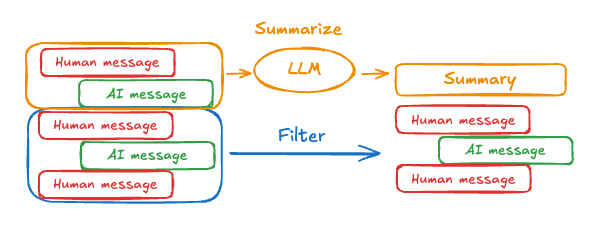
启用短期记忆后,长时间的对话可能会超出 LLM 的上下文窗口。常见的解决方案有:- 修剪消息:移除前 N 条或后 N 条消息(在调用 LLM 之前)
- 删除消息:从 LangGraph 状态中永久删除消息
- 摘要消息:总结历史记录中较早的消息,并用摘要替换它们
- 管理检查点:存储和检索消息历史记录
- 自定义策略(例如,消息过滤等)
修剪消息
大多数 LLM 都有一个最大支持的上下文窗口(以 token 计)。一种决定何时截断消息的方法是:计算消息历史记录中的 token 数,并在接近该限制时进行截断。如果你使用的是 LangChain,可以使用 trim messages 工具,并指定要从列表中保留的 token 数量,以及处理边界时使用的strategy(例如,保留最后 maxTokens 个 token)。
要修剪消息历史,请使用 trimMessages 函数:
import { trimMessages } from "@langchain/core/messages";
import { StateSchema, MessagesValue, GraphNode } from "@langchain/langgraph";
const State = new StateSchema({
messages: MessagesValue,
});
const callModel: GraphNode<typeof State> = async (state) => {
const messages = trimMessages(state.messages, {
strategy: "last",
maxTokens: 128,
startOn: "human",
endOn: ["human", "tool"],
});
const response = await model.invoke(messages);
return { messages: [response] };
};
const builder = new StateGraph(State)
.addNode("call_model", callModel);
// ...
完整示例:修剪消息
完整示例:修剪消息
import { trimMessages } from "@langchain/core/messages";
import { ChatAnthropic } from "@langchain/anthropic";
import { StateGraph, StateSchema, MessagesValue, GraphNode, START, MemorySaver } from "@langchain/langgraph";
const State = new StateSchema({
messages: MessagesValue,
});
const model = new ChatAnthropic({ model: "claude-3-5-sonnet-20241022" });
const callModel: GraphNode<typeof State> = async (state) => {
const messages = trimMessages(state.messages, {
strategy: "last",
maxTokens: 128,
startOn: "human",
endOn: ["human", "tool"],
tokenCounter: model,
});
const response = await model.invoke(messages);
return { messages: [response] };
};
const checkpointer = new MemorySaver();
const builder = new StateGraph(State)
.addNode("call_model", callModel)
.addEdge(START, "call_model");
const graph = builder.compile({ checkpointer });
const config = { configurable: { thread_id: "1" } };
await graph.invoke({ messages: [{ role: "user", content: "hi, my name is bob" }] }, config);
await graph.invoke({ messages: [{ role: "user", content: "write a short poem about cats" }] }, config);
await graph.invoke({ messages: [{ role: "user", content: "now do the same but for dogs" }] }, config);
const finalResponse = await graph.invoke({ messages: [{ role: "user", content: "what's my name?" }] }, config);
console.log(finalResponse.messages.at(-1)?.content);
你的名字是 Bob,这是你第一次自我介绍时提到的。
删除消息
你可以从图状态中删除消息来管理消息历史记录。这在你想移除特定消息或清空整个消息历史记录时很有用。 要从图状态中删除消息,可以使用RemoveMessage。要使 RemoveMessage 生效,需要为状态键使用带有 messagesStateReducer reducer 的状态,例如 MessagesValue。
要删除特定消息:
import { RemoveMessage } from "@langchain/core/messages";
const deleteMessages = (state) => {
const messages = state.messages;
if (messages.length > 2) {
// 移除最早的两条消息
return {
messages: messages
.slice(0, 2)
.map((m) => new RemoveMessage({ id: m.id })),
};
}
};
删除消息时,务必确保 生成的消息历史是有效的。请检查你使用的 LLM 服务商的限制条件。例如:
- 有些服务商要求消息历史以
user消息开头。 - 大多数服务商要求包含工具调用的
assistant消息之后必须跟随相应的tool结果消息。
完整示例:删除消息
完整示例:删除消息
import { RemoveMessage } from "@langchain/core/messages";
import { ChatAnthropic } from "@langchain/anthropic";
import { StateGraph, StateSchema, MessagesValue, GraphNode, START, MemorySaver } from "@langchain/langgraph";
const State = new StateSchema({
messages: MessagesValue,
});
const model = new ChatAnthropic({ model: "claude-3-5-sonnet-20241022" });
const deleteMessages: GraphNode<typeof State> = (state) => {
const messages = state.messages;
if (messages.length > 2) {
// 移除最早的两条消息
return { messages: messages.slice(0, 2).map(m => new RemoveMessage({ id: m.id })) };
}
return {};
};
const callModel: GraphNode<typeof State> = async (state) => {
const response = await model.invoke(state.messages);
return { messages: [response] };
};
const builder = new StateGraph(State)
.addNode("call_model", callModel)
.addNode("delete_messages", deleteMessages)
.addEdge(START, "call_model")
.addEdge("call_model", "delete_messages");
const checkpointer = new MemorySaver();
const app = builder.compile({ checkpointer });
const config = { configurable: { thread_id: "1" } };
for await (const event of await app.stream(
{ messages: [{ role: "user", content: "hi! I'm bob" }] },
{ ...config, streamMode: "values" }
)) {
console.log(event.messages.map(message => [message.getType(), message.content]));
}
for await (const event of await app.stream(
{ messages: [{ role: "user", content: "what's my name?" }] },
{ ...config, streamMode: "values" }
)) {
console.log(event.messages.map(message => [message.getType(), message.content]));
}
[['human', "hi! I'm bob"]]
[['human', "hi! I'm bob"], ['ai', 'Hi Bob! How are you doing today? Is there anything I can help you with?']]
[['human', "hi! I'm bob"], ['ai', 'Hi Bob! How are you doing today? Is there anything I can help you with?'], ['human', "what's my name?"]]
[['human', "hi! I'm bob"], ['ai', 'Hi Bob! How are you doing today? Is there anything I can help you with?'], ['human', "what's my name?"], ['ai', 'Your name is Bob.']]
[['human', "what's my name?"], ['ai', 'Your name is Bob.']]
摘要消息
如上所示,修剪或删除消息的问题在于,你可能会因从消息队列中剔除内容而丢失信息。因此,一些应用程序会受益于更复杂的方法:使用聊天模型来总结消息历史。
可以使用提示和编排逻辑来总结消息历史。例如,在 LangGraph 中,你可以在状态中包含一个 summary 键,与 messages 键并列:
import { StateSchema, MessagesValue, GraphNode } from "@langchain/langgraph";
import { z } from "zod/v4";
const State = new StateSchema({
messages: MessagesValue,
summary: z.string().optional(),
});
summarizeConversation 节点可以在 messages 状态键中积累了一定数量的消息后被调用。
import { RemoveMessage, HumanMessage } from "@langchain/core/messages";
const summarizeConversation: GraphNode<typeof State> = async (state) => {
// 首先,我们获取任何现有的摘要
const summary = state.summary || "";
// 创建我们的摘要提示
let summaryMessage: string;
if (summary) {
// 已经存在一个摘要
summaryMessage =
`This is a summary of the conversation to date: ${summary}\n\n` +
"Extend the summary by taking into account the new messages above:";
} else {
summaryMessage = "Create a summary of the conversation above:";
}
// 将提示添加到我们的历史记录中
const messages = [
...state.messages,
new HumanMessage({ content: summaryMessage })
];
const response = await model.invoke(messages);
// 删除除最近 2 条消息以外的所有消息
const deleteMessages = state.messages
.slice(0, -2)
.map(m => new RemoveMessage({ id: m.id }));
return {
summary: response.content,
messages: deleteMessages
};
};
完整示例:摘要消息
完整示例:摘要消息
import { ChatAnthropic } from "@langchain/anthropic";
import {
SystemMessage,
HumanMessage,
RemoveMessage,
} from "@langchain/core/messages";
import {
StateGraph,
StateSchema,
MessagesValue,
GraphNode,
ConditionalEdgeRouter,
START,
END,
MemorySaver,
} from "@langchain/langgraph";
import * as z from "zod";
const memory = new MemorySaver();
// 我们将添加一个 `summary` 属性(在 `messages` 键之外)
const GraphState = new StateSchema({
messages: MessagesValue,
summary: z.string().default(""),
});
// 我们将使用这个模型进行对话和摘要
const model = new ChatAnthropic({ model: "claude-haiku-4-5-20251001" });
// 定义调用模型的逻辑
const callModel: GraphNode<typeof GraphState> = async (state) => {
// 如果存在摘要,我们将其作为系统消息添加进来
const { summary } = state;
let { messages } = state;
if (summary) {
const systemMessage = new SystemMessage({
id: crypto.randomUUID(),
content: `Summary of conversation earlier: ${summary}`,
});
messages = [systemMessage, ...messages];
}
const response = await model.invoke(messages);
// 我们返回一个对象,因为它将被添加到现有状态
return { messages: [response] };
};
// 现在我们定义用于判断是结束还是总结对话的逻辑
const shouldContinue: ConditionalEdgeRouter<typeof GraphState, "summarize_conversation"> = (state) => {
const messages = state.messages;
// 如果消息数量超过六条,那么我们就总结对话
if (messages.length > 6) {
return "summarize_conversation";
}
// 否则我们可以直接结束
return END;
};
const summarizeConversation: GraphNode<typeof GraphState> = async (state) => {
// 首先,我们总结对话
const { summary, messages } = state;
let summaryMessage: string;
if (summary) {
// 如果摘要已经存在,我们使用一个不同的系统提示
// 来总结它,而不是没有摘要时那样
summaryMessage =
`This is summary of the conversation to date: ${summary}\n\n` +
"Extend the summary by taking into account the new messages above:";
} else {
summaryMessage = "Create a summary of the conversation above:";
}
const allMessages = [
...messages,
new HumanMessage({ id: crypto.randomUUID(), content: summaryMessage }),
];
const response = await model.invoke(allMessages);
// 我们现在需要删除那些我们不想再显示的消息
// 我将删除除最后两条消息以外的所有消息,但你可以更改这个策略
const deleteMessages = messages
.slice(0, -2)
.map((m) => new RemoveMessage({ id: m.id! }));
if (typeof response.content !== "string") {
throw new Error("Expected a string response from the model");
}
return { summary: response.content, messages: deleteMessages };
};
// 定义一个新图
const workflow = new StateGraph(GraphState)
// 定义对话节点和摘要节点
.addNode("conversation", callModel)
.addNode("summarize_conversation", summarizeConversation)
// 将入口点设置为 conversation
.addEdge(START, "conversation")
// 我们现在添加一条条件边
.addConditionalEdges(
// 首先,我们定义起始节点。我们使用 `conversation`。
// 这意味着这些是调用 `conversation` 节点之后要走的边。
"conversation",
// 接着,我们传入将决定接下来调用哪个节点的函数。
shouldContinue,
)
// 我们现在从 `summarize_conversation` 添加一条连接到 END 的普通边。
// 这意味着在调用 `summarize_conversation` 之后,我们就结束了。
.addEdge("summarize_conversation", END);
// 最后,我们编译它!
const app = workflow.compile({ checkpointer: memory });
管理检查点
你可以查看和删除由检查点存储器存储的信息。查看线程状态
const config = {
configurable: {
thread_id: "1",
// 可选地,为特定检查点提供 ID,
// 否则将显示最新的检查点
// checkpoint_id: "1f029ca3-1f5b-6704-8004-820c16b69a5a"
},
};
await graph.getState(config);
{
values: { messages: [HumanMessage(...), AIMessage(...), HumanMessage(...), AIMessage(...)] },
next: [],
config: { configurable: { thread_id: '1', checkpoint_ns: '', checkpoint_id: '1f029ca3-1f5b-6704-8004-820c16b69a5a' } },
metadata: {
source: 'loop',
writes: { call_model: { messages: AIMessage(...) } },
step: 4,
parents: {},
thread_id: '1'
},
createdAt: '2025-05-05T16:01:24.680462+00:00',
parentConfig: { configurable: { thread_id: '1', checkpoint_ns: '', checkpoint_id: '1f029ca3-1790-6b0a-8003-baf965b6a38f' } },
tasks: [],
interrupts: []
}
查看线程历史
const config = {
configurable: {
thread_id: "1",
},
};
const history = [];
for await (const state of graph.getStateHistory(config)) {
history.push(state);
}
删除线程的所有检查点
const threadId = "1";
await checkpointer.deleteThread(threadId);
数据库管理
如果你使用任何由数据库支持的持久化实现(例如 Postgres、Redis 或 Oracle)来存储短期和/或长期记忆,则需要在你将其用于数据库之前运行迁移以设置所需的模式。 按照惯例,大多数特定于数据库的库会在检查点存储器或存储实例上定义一个setup() 方法,用于运行所需的迁移。但是,你应该核对你的 BaseCheckpointSaver 或 BaseStore 的具体实现,以确认确切的方法名称和用法。
我们建议将迁移作为一个专门的部署步骤来运行,或者确保它们作为服务器启动的一部分被运行。
Connect these docs to Claude, VSCode, and more via MCP for real-time answers.